
Feedback Loop
The feedback loop compares AI-predicted times with actual production times. Each shop floor feedback entry enriches your database and progressively improves prediction model accuracy.
Prerequisites
- Have saved a prediction for at least one part
How to
Step 1 — Open shop floor feedback
From the AI Co-pilot page, click the Shop Floor Feedback button.
Step 2 — Select the part
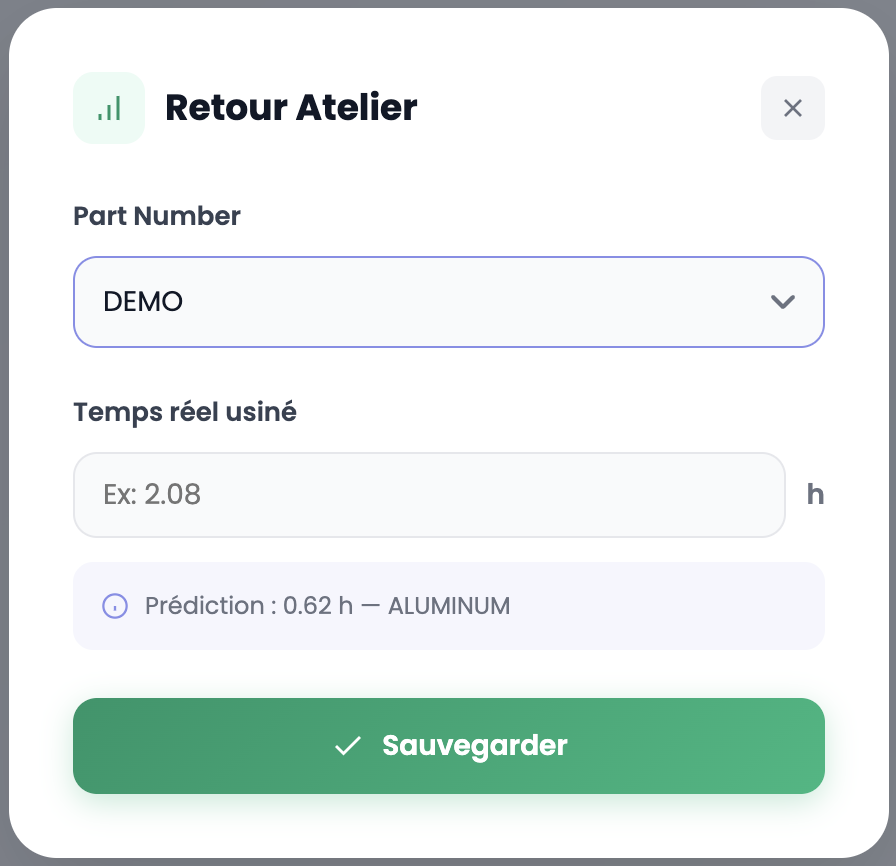
In the modal, select the Part Number from the dropdown for the part you want to provide feedback on. The associated prediction is shown at the bottom of the form (predicted time and material).
Step 3 — Enter actual time
Enter the Actual machined time (in hours) recorded in production.
Step 4 — Save
Click Save to record the shop floor feedback.
Continuous model improvement
The more shop floor feedback you enter, the more accurate your prediction models become. The AI trains dynamically on your company's real data: each feedback entry narrows the gap between predicted and actual times, improves the confidence index and refines prediction ranges.
TIP
Make it a habit to enter shop floor feedback as soon as parts are produced. This is the key to getting increasingly reliable predictions over time.